
Appearance
Attendance records
One row per person per day: when they clocked in, when they clocked out, how long they worked, and whether the system considers that on time. This is the page you open when somebody asks "was she here yesterday?".
Menu path HR › Attendance management
Address https://hub.cnvconnect.com/attendance
Permission attendance_list:view
Who uses it HR, shift managers, payroll
The screen
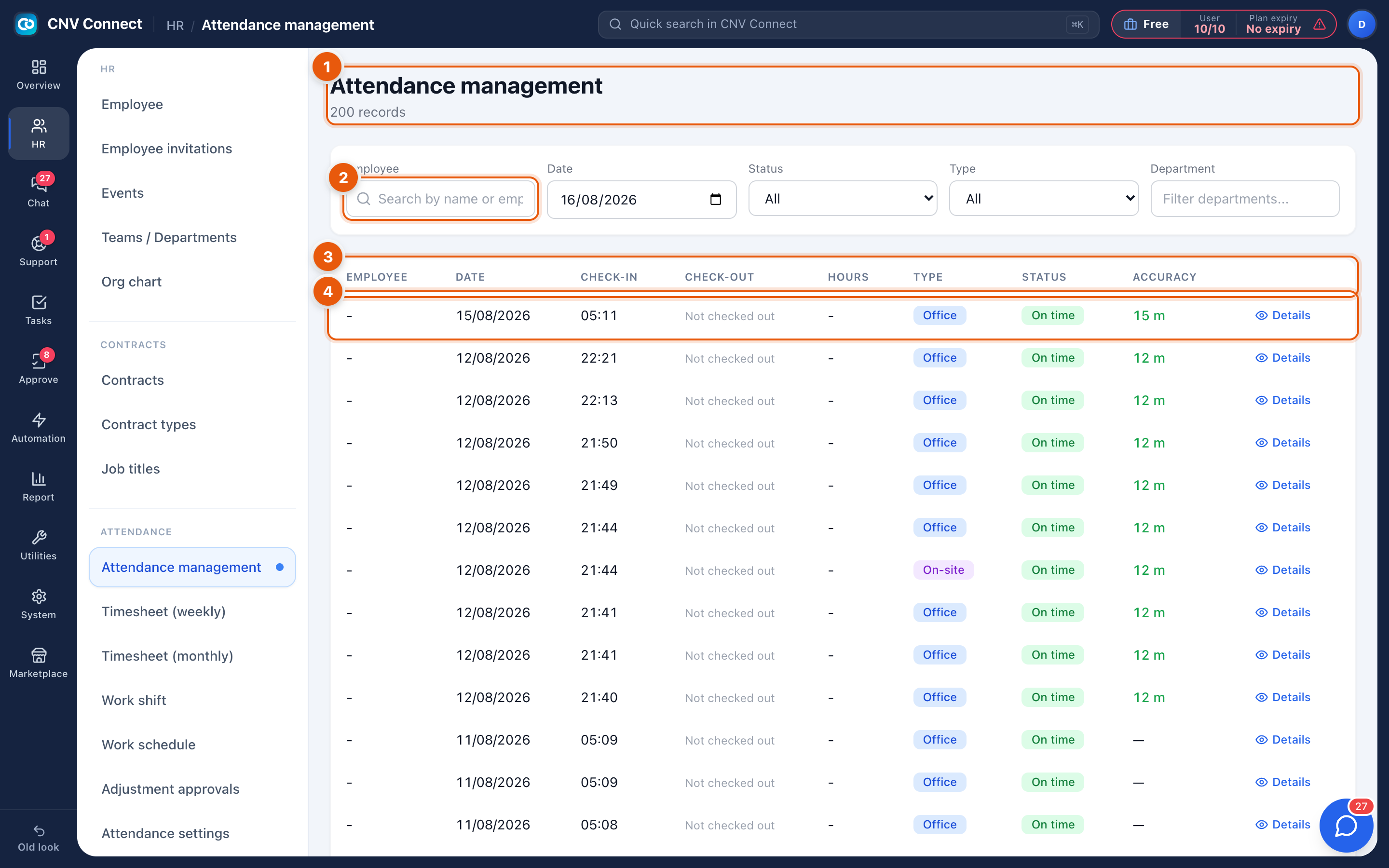
- Page title — attendance management, with how many records match.
- Search — by employee name or ID; the date, department, status (All, On time, Late, Left early, Absent) and type (Office, On-site) filters sit on the same row.
- Columns — employee, date, check-in, check-out, hours, type, status and accuracy (how far from the registered location the phone was).
- A row — one attendance record. Details opens everything captured with it: coordinates, map position, photo, device and any note.
Reading a record
| Column | What to look for |
|---|---|
| Check-in / check-out | Not checked out means the shift is still open — normal during the day, a problem the next morning |
| Hours | Only calculated once both ends exist |
| Type | Office = inside a registered location, On-site = a field check-in |
| Status | Derived from the person's shift and the attendance rules |
| Accuracy | The GPS radius the phone reported. A large number means a weak signal, not necessarily cheating |
How to…
Check one person over several days
Search for their name, then step the date backwards. For a whole week or month in one view, use the weekly or monthly timesheet instead.
Investigate a suspicious punch
- Select Details on the row.
- Compare the recorded position with the registered location, and look at the photo if your rules require one.
- If the record is genuinely wrong, ask the employee to submit a correction from the mobile app; approve it in Adjustment approvals. Approved corrections rewrite the record and leave an audit trail — editing silently is deliberately not possible.
Explain "Absent"
Absent means the person was scheduled and nothing was recorded. Check, in this order: the work schedule (were they really on shift?), approved leave, and finally whether they forgot to clock in.
Notes
- Records arrive from the mobile app. There is no "clock in" button on the web workspace.
- Late and left-early are computed against the shift the person was rostered to, so shifts and the roster have to exist before any of these labels mean anything.
- Changing an attendance rule mid-period does not rewrite history by itself — use Recalculate timesheets on the Attendance settings page.