
Appearance
Suppliers
The companies you buy from, with their status: active, paused, or blacklisted.
Menu path Utilities › Suppliers
Address https://hub.cnvconnect.com/utilities/suppliers
Permission suppliers:view
Who uses it procurement, office managers
The screen
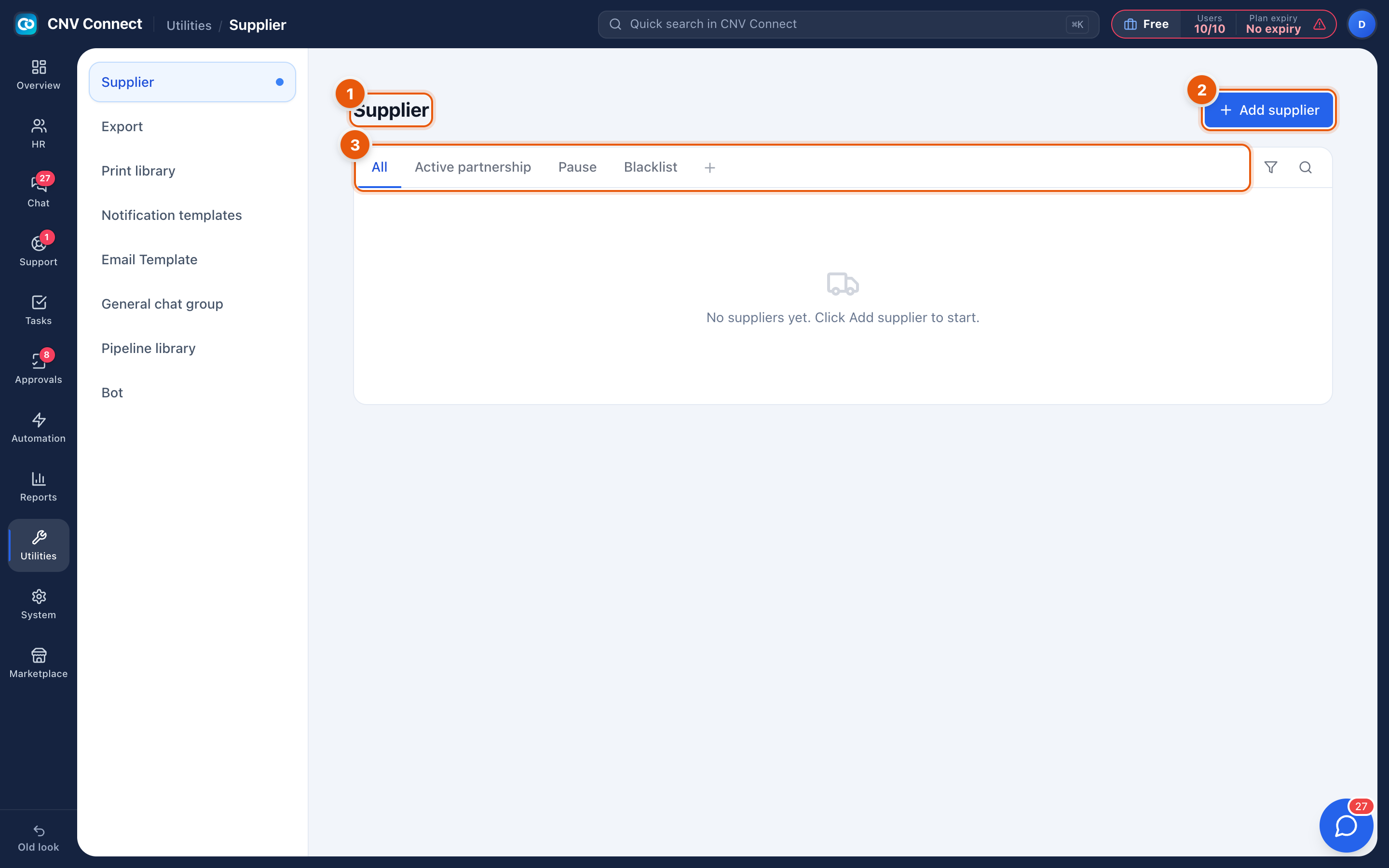
- Page title — supplier list.
- Add supplier — register one.
- Status tabs — All, Active partnership, Pause, Blacklist.
How to…
Register a supplier
- Select Add supplier.
- Record the company name, tax or registration number, address, and the person you deal with.
- Set the status to active partnership.
Pause or blacklist
Pausing says "not right now" — a contract under review, a quality problem being worked through. Blacklisting says "not again", and should carry a note explaining why, because the person who reads it in two years will not remember.
Open a supplier
Select the row. The supplier page collects contacts, notes and the history of your dealings.
Notes
- The status is advisory: nothing stops somebody buying from a blacklisted supplier, so the value is in the record and the note.
- Suppliers connect naturally to assets (who sold you the equipment) and to digital assets (who bills you for the subscription).