
Appearance
Job title catalogue
The list of job titles the company uses. Keeping it as a catalogue — rather than free text on each employee — is what makes headcount reports and org charts consistent.
Menu path HR › Job title catalog
Address https://hub.cnvconnect.com/employees/job-titles
Permission employees_contracts:view
Who uses it HR
The screen
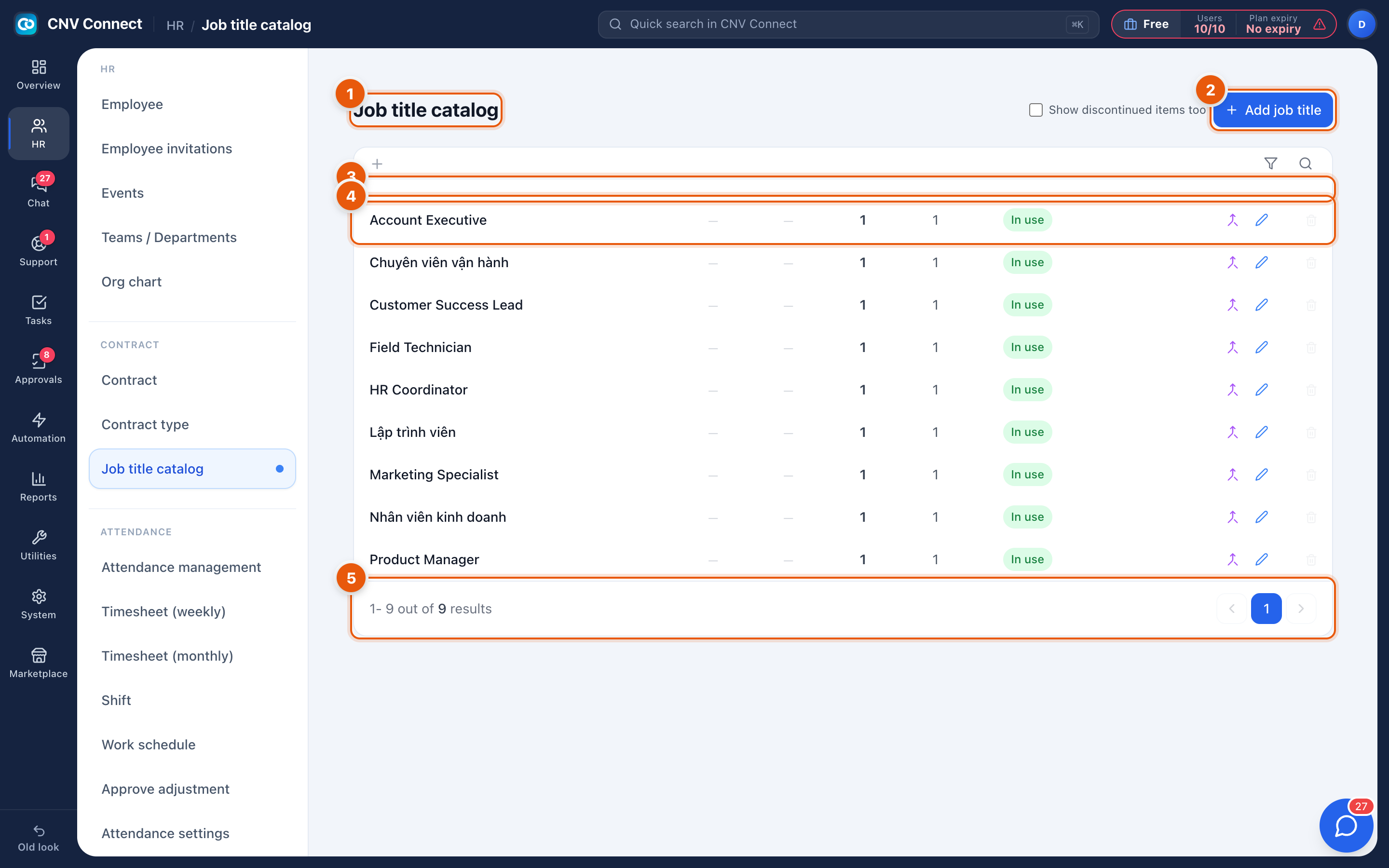
- Page title — job title catalogue.
- Add job title — create a title.
- Columns — the title, the department and level it belongs to, and how many employees and positions use it.
- A row — select it to rename the title or change its grouping.
- Paging — how many titles matched, and the page control.
How to…
Add a title
- Select Add job title.
- Enter the name exactly as it should appear on contracts and in the org chart.
- Save. It becomes selectable on employee records straight away.
Clean up duplicates
Titles typed differently ("Sr. Developer" and "Senior Developer") split your headcount reports. Rename one to match the other, then move the affected employees onto the surviving title and retire the duplicate.
Notes
- The usage counts tell you what is safe to retire: a title used by nobody can go without consequences.
- A workspace created from a Vietnamese template may arrive with Vietnamese job titles. Rename them to your own wording — nothing else depends on the text.
- Job titles are descriptive only. Permissions come from Roles, not from a person's title.