
Appearance
Work schedule (roster)
Who works which shift on which day. The roster is what turns a list of shift patterns into an actual week, and it is what the attendance rules compare against when they decide whether somebody was late or absent.
Menu path HR › Work schedule
Address https://hub.cnvconnect.com/attendance/roster
Permission attendance_list:view
Who uses it shift managers, operations
This screen is not translated yet
The roster is one of the newest screens and its labels still appear in Vietnamese in the product. This article names every control by what it does and where it sits, in the order shown in the screenshot.
The screen
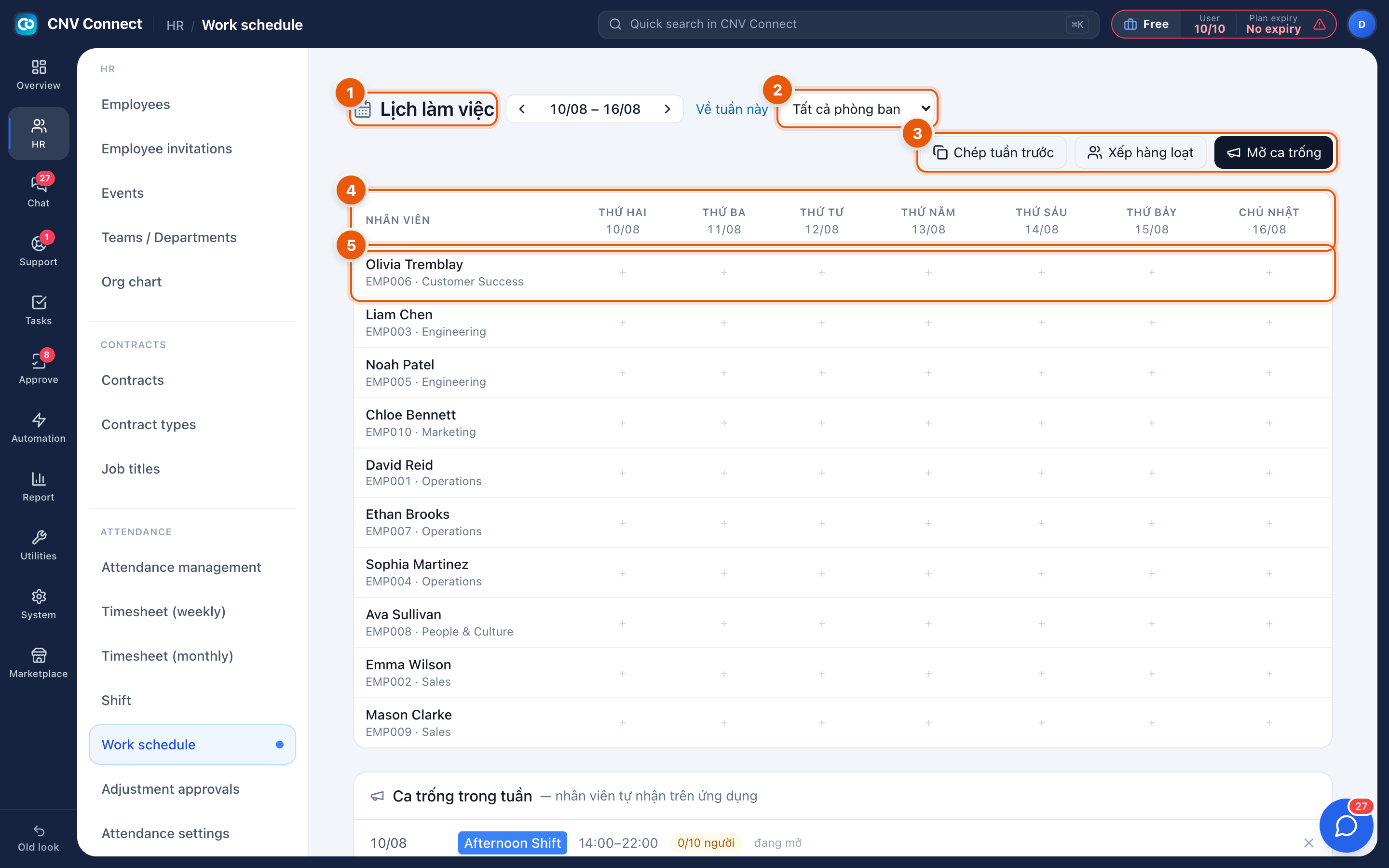
- Page title — the work schedule, with the week controls beside it, including a this week button.
- Department filter — all departments, or one team.
- Bulk actions — copy last week, bulk assign, and open shift, which publishes an unfilled shift employees can claim from the mobile app.
- Grid header — the employee column and the seven days, Monday to Sunday.
- An employee row — the + in a cell assigns a shift to that person on that day; an assigned cell shows the shift instead.
How to…
Roster a week
- Choose the week.
- Select copy last week if last week's pattern still applies, then adjust the exceptions.
- Otherwise select + in each cell and pick the shift, or use bulk assign for a block of people and days.
Let people pick up spare shifts
- Select open shift and describe the shift and the day.
- It appears in the unfilled panel and in the mobile app.
- The first employee to accept it is assigned, and the cell fills in.
Handle somebody going on leave
Approved leave is not automatically removed from the roster — clear the cells, or the person will be counted as absent for a shift they were not expected to work.
Notes
- The roster only accepts shifts that already exist in Shifts.
- Rostering is what makes late and absent computable; without it, attendance records still capture times but the workspace cannot judge them.
- Employees see their own roster in the mobile app as soon as you save it.